


Frequently asked questions
Answers on amplifier platforms, software and system configuration.
Speaker Preset
15 questionsRun ArmoníaPlus on Mac - Discovery the Amplifiers
We are now ready to click on ‘Design>Match’and select 'Discovery' to view all the amplifiers connected to the network.
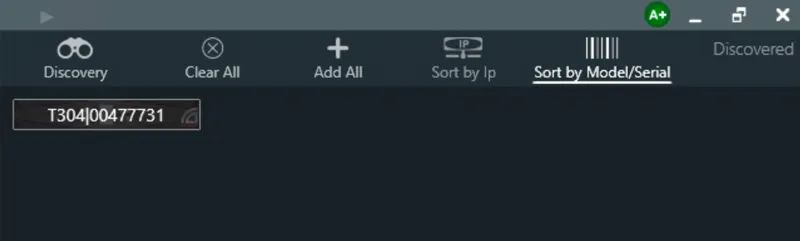
Discovery
Run ArmoníaPlus on Mac - Communication Manager
Once the network is enabled you need to go on ‘Communication manager’ in ArmoníaPlus and choose thenetworkwhere the amplifiers are connected, in our example:
- EthernetIPaddress169.254.x.x
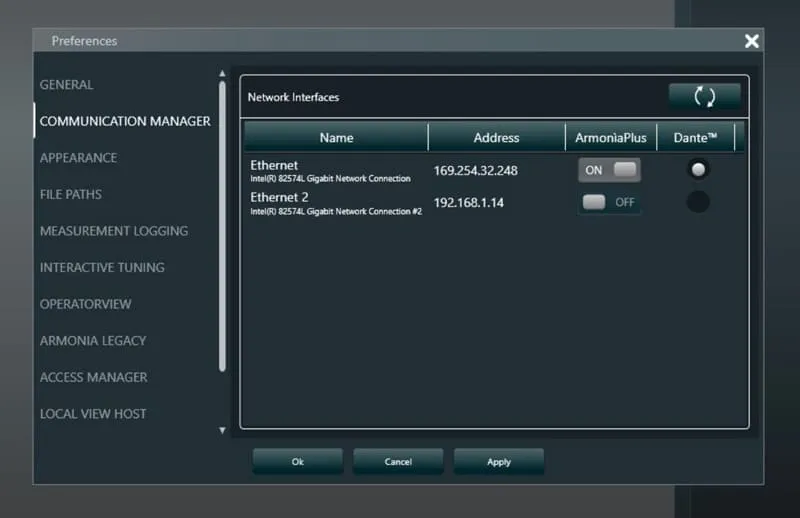
Communication Manager
Run ArmoníaPlus on Mac - Network configuration on Windows
Next, go to Windows Preferences/Configurations and select the sources for Networks 1 and 2.
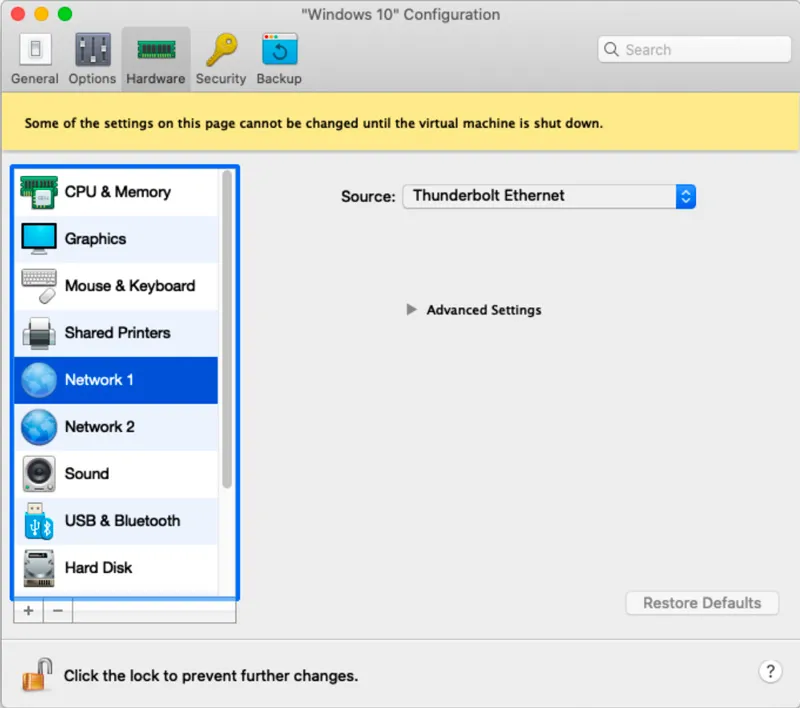
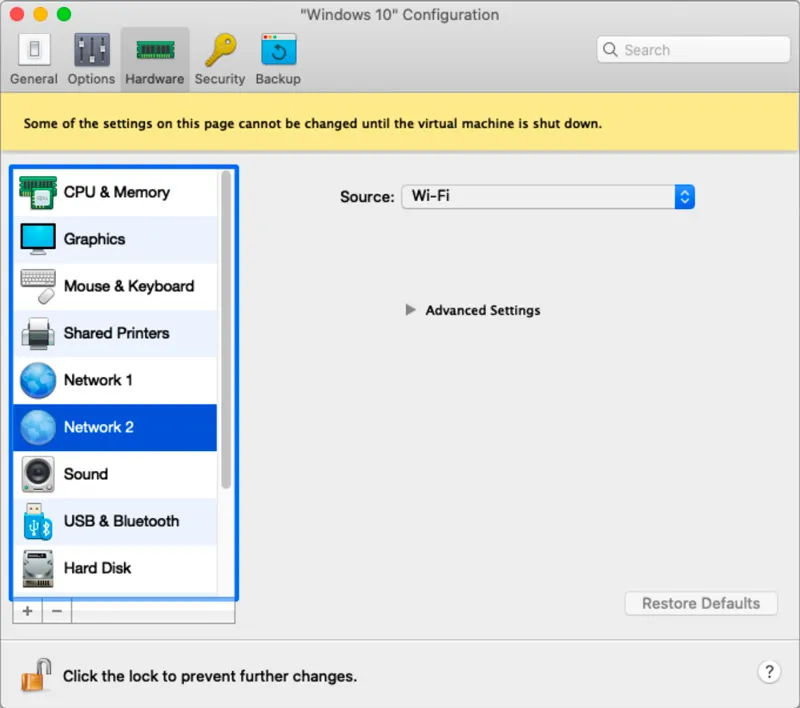
For Network 1, select the Ethernet Adapter. For network 2, selectWi-Fi
Run ArmoníaPlus on Mac - Network configuration on Mac
Next, set up the network on your Mac. Go toSystemPreferences, thenNetwork.
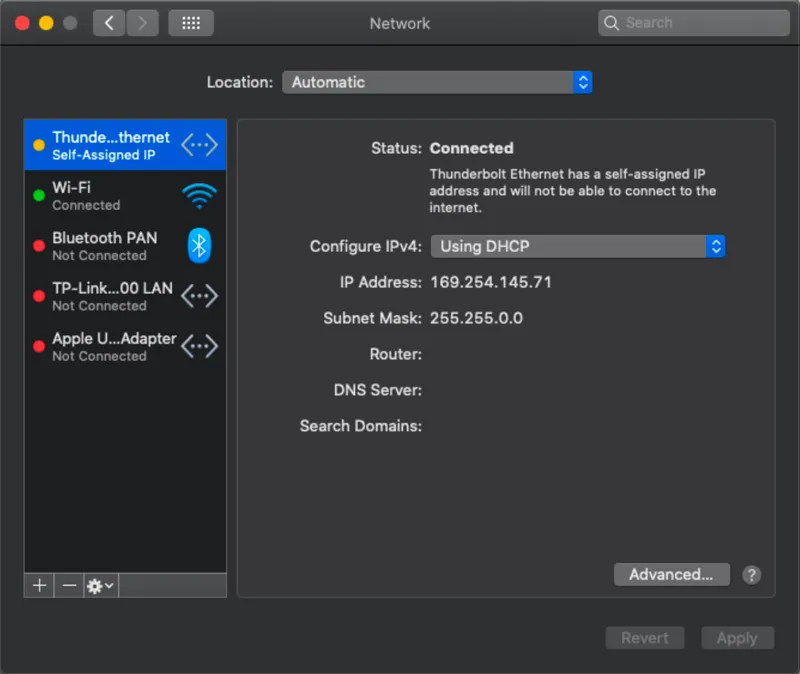
System Preferences > Network > Ethernet
Anethernetadaptershould already appear in the list of networks if inserted, if not, just click on the+button and add a new network. We recommend using the originalAppleThunderboltEthernet adapter. Enable yourMac’sWi-Fi, which will then be shared with the Windows partition, allowing you to update ArmoníaPlus and use all the services that need internet.
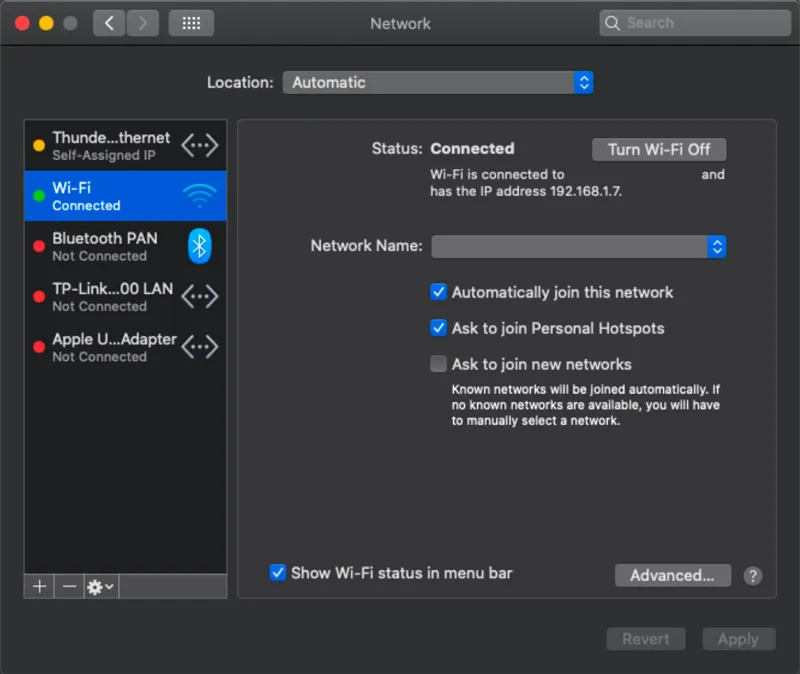
System Preferences > Network > Wi-Fi
Run ArmoníaPlus on Mac - Download & Install
Parallels Desktop or other virtualization software for Windows.
ArmoníaPlus, you can find the latest version on com
Run ArmoníaPlus on Mac
In this application note we will explain how to use ArmoníaPlus on your Mac through Windows virtualization software. The procedure is fundamentally the same for the various software’s in the market and for our example we will use Parallels Desktop.
How to calculate limiter values
To calculateVoltagethresholds, attack, and release time for the three basic limiters available in ArmonìaPlus, Powersoft has developed a tool called thePowerSharingTool. In this tool, there is a dedicated section called “SuggestedLimiters threshold” that can be used as asafestarting point while working with limiters. Simply add the loudspeaker’sAESpower, and the nominal impedance and select its profile (or the way of the loudspeaker). Once these values are specified the tool will calculate and suggest a possible limiters configuration. The tool provides calculations for bothLow-Z loudspeakersandHi-Z lines (100V, 70V, and 25V) Remember that this is only the starting point, especially for a multi-way loudspeaker where it is always suggested to analyze the behavior of the ways with a musical or pseudo-musical signal. In this way, tonality unbalances due to wide differences in gain reduction between thetransducerscan be avoided.
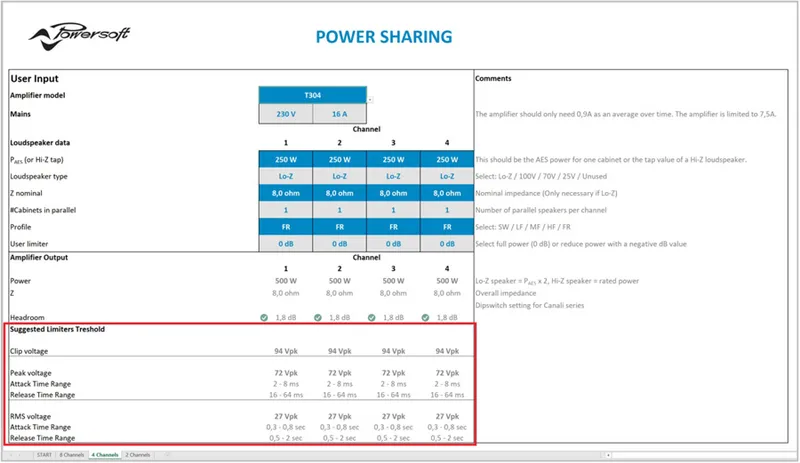
Powersoft Power Sharing tool limiters section.
After this basic analysis of Powersoft limiters we can focus on two key points: the first one is that all Powersoft limiters are made to protect the loudspeaker, so it is best practice to have them always enabled. The second one concerns the sound quality and good system design: the best performances in audio quality are achieved when, as mentioned previously, RMS limiters can do the heaviest part of the job in terms of gain reduction, then Peak limiters to control transients and Clip limiters as a final safety point. By following this simple workflow, you will achieve the best audio quality from your system, ensuring its long lifespan.
How Powersoft limiters work - Clip Limiter
The Powersoft clip limiter is a “brickwall” limiter that blocks the driving signal, not allowing it to exceed the threshold. This limiter has a fixed attack time of 0.3 ms with a lookahead of 0.3 ms that allows anticipating peaks before they occur and therefore with the benefit of less distortion by not having a hard clip. Clip limiters are very fast and are the last safety tool that can be used to avoid loudspeaker damage. To achieve the best result in quality and performance, it is suggested a gain reduction between 0 and 3 dB and engage also Peak and RMS limiters.
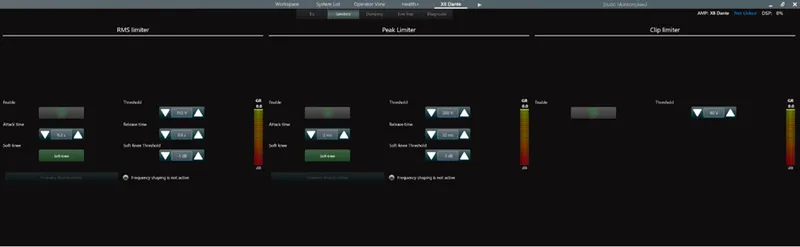
Limiters (basic) in ArmonìaPlus.
How Powersoft limiters work - Peak Limiter
The peak limiter avoids potentially dangerous displacement of the cone (larger excursion with respect to the allowed values), and it is based only on the quantity of signal that is sent through that channel.
Peak limiters, as well as RMS and Clip limiters, are independent from the number of parallel wired speakers: you can use the power and impedance of a single speaker or the power and impedance of the parallel circuit, the given result will be the same.
Pushing into a peak limiter can reduce the crest factor, thus “ squashing ” the dynamics of the original signal. For most applications, 3 to 9 dB of gain reduction is usually suggested.
How Powersoft limiters work - RMS Limiter
The RMS limiter is intended to prevent burning the driver’s voice coil, while at the same time exploiting their maximum performance. The RMS limiter should not be engaged at normal working levels since a common musical signal has very high peaks, but a rather small average level.
Limiter Parameters - Soft Knee
A soft knee slowly increases the compression ratio as the level increases, this way the changing from un-compressed to compressed sound is less audible. This value in Powersoft limiters is expressed in dB below the threshold.
Limiter Parameters - Release Time
It is the time that the gain takes to go from the maximum reduction to 30% of reduction. In general, the release time, must be adequate to avoid a pumping effect and protect the speaker. The release time can be set between 1 to 32 times the attack time.
Limiter Parameters - Attack time
It is the time the limiter takes to get 70% of the total required reduction after exceeding the threshold level. In applications where we want to avoid speaker damage, the longer the attack time, the higher the risk of damaging the equipment. However, settings with a too fast attack time can generatedistortionsor a deep modification to thetransientof thesignal, especially with percussive sounds, resulting in poor perceived sound quality. Typically, a good compromise is to set an attack time no longer than the lowest frequency you need to protect (i.e., 1 ms for an HF driver with X-over at 1kHz octave band).
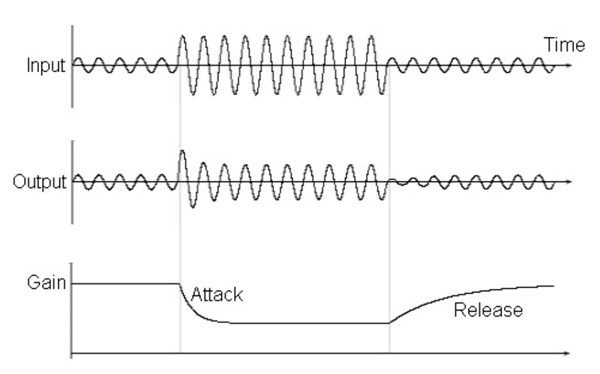
Limiter acting on an audio signal
Limiter Parameters - Threshold
When the input signal level exceeds the threshold, the limiter starts to reduce the input gain. Gain is reduced of an amount equal to the overshoot of the input signal with respect to the threshold.
The threshold value is expressed in Volt because it depends on the power of the loudspeaker and its impedance
Limiting, Speaker Damage and Power Compression
The limiting process insoundreinforcementis a way toprotect loudspeakersfromaccidentaldamage; therefore, limiters are a safeguard against excessivesignalpeaksand/or signal long-term average power. Bear in mind that limiting does not only prevent occasional damage, but it first and foremostguarantees a long loudspeaker life. Speaker limiter designers do not usually concentrate on coloring sound, but rather onspeakerprotection. Typical applications in the audio chain are:
- Controlling theenergyof a signal.
- Controlling thepeaklevelsof a signal.
- Reducing thedynamicrangeof a signal.
Remember that in sound reinforcement you are dealing with power signal (that means highvoltageandcurrents), so the target with limiters is to protect the drivers from the two main causes of damage:
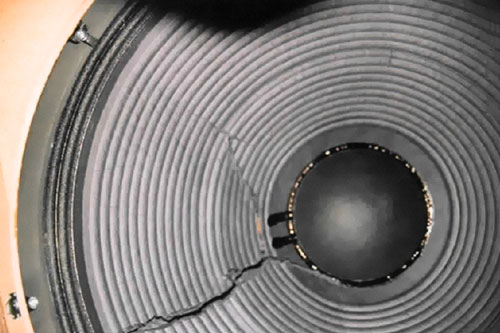
Over-excursion: An impulsive signal can reach the speakers and cause damage due to over-excursion of the voice coil that is driven out of the mechanical limit. This can damage thediaphragmby deforming or breaking it.
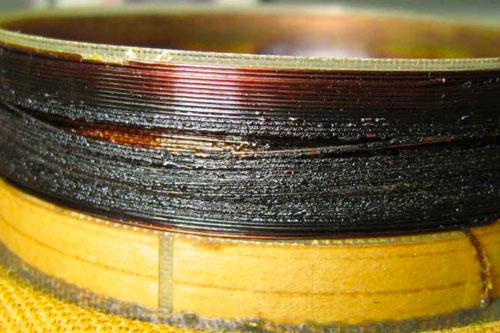
Over-heating: Delivering high power for too much time may lead to overheating of thevoicecoilcopper, the coil former, the magnet, the suspensions, and the cone itself. Another effect is powercompression, more noticeable in low-frequency speakers. When there is power compression there is an increase in the impedance and a decrease in power with the result of less perceived loudness!